---
title: Candidate Assessment Errors
description: There are a few errors that may be present based upon the candidate's unique assessment experience. Here we discuss some of the most common errors, why they might appear, and how to resolve.
---
[Skip to content](https://help.prevuehr.com/candidate-assessment-errors#main-content)
English
Show submenu for translations
[Contact Us](https://help.prevuehr.com/kb-tickets/new?hsLang=en)
[![support.png\]](https://help.prevuehr.com/hs-fs/hubfs/support.png?height=40&name=support.png)](https://help.prevuehr.com/?hsLang=en)
- [Tickets](https://help.prevuehr.com/tickets-view)
- [Sign out](https://help.prevuehr.com/_hcms/mem/logout)
Open main navigation
Close main navigation
- [Tickets](https://help.prevuehr.com/tickets-view)
- [Sign out](https://help.prevuehr.com/_hcms/mem/logout)
- English
Show submenu for translations
- [Contact Us](https://help.prevuehr.com/kb-tickets/new)
- [Candidate Resources Hub](https://candidates.prevuehr.com/)
[Candidate Resources Hub](https://candidates.prevuehr.com/?hsLang=en)
Welcome to the Prevue Help Center!
- There are no suggestions because the search field is empty.
1. [Help Center](https://help.prevuehr.com/?hsLang=en)
2. [PrevueHub](https://help.prevuehr.com/prevuehub?hsLang=en)
3. [Troubleshooting & Support](https://help.prevuehr.com/prevuehub?hsLang=en#troubleshooting-support)
# Candidate Assessment Errors
## Common assessment errors, why they may appear, and how to resolve them in Prevue Hub.
[Click here to jump directly to 'How to Resolve'](https://help.prevuehr.com/candidate-assessment-errors#How-to-resolve-error)
### **Error:** "Uh oh! Something went wrong."
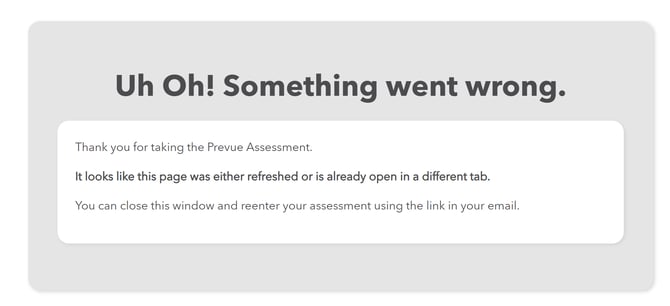
#### This error may appear if the candidate:
- Closed the assessment browser window
- Lost internet connection during the assessment
- Refreshed the assessment browser window
---
### **Error: Hmm, that's not quite right.**
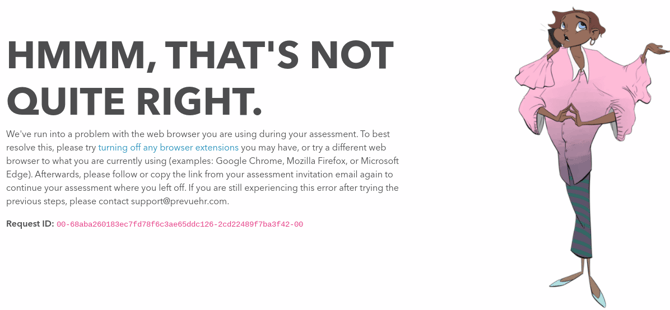
#### This error may appear if the candidate:
- Has browser extensions interfering with the assessment
- Is using an outdated browser
- Does not have JavaScript enabled
- Has slow internet or high latency
---
### Error: 404 - Oops! Page not found.
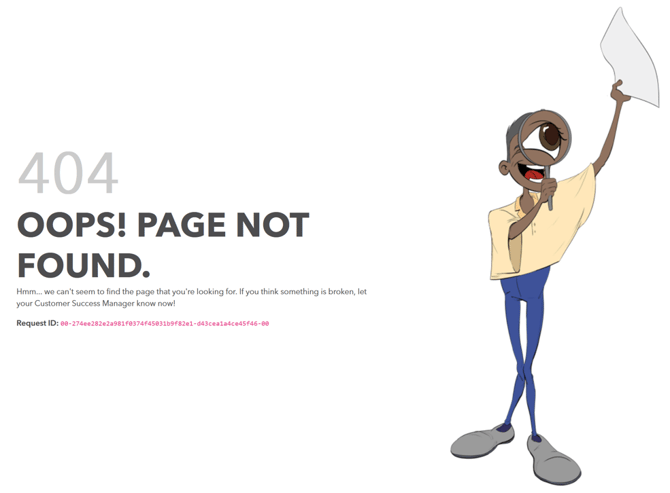
#### This error may appear if:
- The assessment link was revoked
- The candidate profile was deleted in Prevue Hub
- The assessment link was copied incorrectly
---
### Error: Time is up! ( Early Timer )
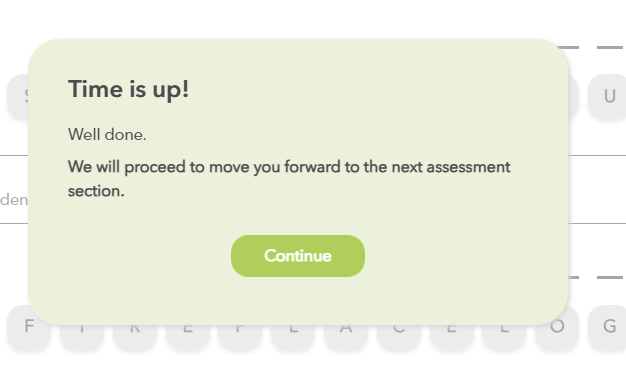
This error may appear if the assessment timer ended earlier than expected.
Common causes include:
- Slow internet or high latency
- Temporary loss of internet connection
- An outdated browser
---
### How to Resolve an Assessment Error
To troubleshoot an assessment error:
1. Go to the candidate’s **Candidate Profile**.
2. Scroll to the **Prevue Assessments** section.
3. Click **Options**.
4. Select **Troubleshoot**.
5. Choose the appropriate troubleshooting option.
6. Click **Resolve Issue**.
### If the Timer Ended Early
For timer-related issues, you may need to:
1. Reset the section causing the error.
2. Revoke the assessment.
3. Resend only the missing sections to the candidate.
This is the most common resolution for early timer issues.
- [PrevueHub](https://help.prevuehr.com/prevuehub?hsLang=en#main-content)
- [Getting Started with Prevue](https://help.prevuehr.com/prevuehub?hsLang=en#getting-started-with-prevue)
- [Managing Assessments](https://help.prevuehr.com/prevuehub?hsLang=en#managing-assessments)
- [Positions & Studies](https://help.prevuehr.com/prevuehub?hsLang=en#positions-studies)
- [Reporting and Insights](https://help.prevuehr.com/prevuehub?hsLang=en#reporting-and-insights)
- [Team Management (Premium Users)](https://help.prevuehr.com/prevuehub?hsLang=en#team-management-premium-users)
- [Settings & Customization](https://help.prevuehr.com/prevuehub?hsLang=en#settings-customization)
- [Troubleshooting & Support](https://help.prevuehr.com/prevuehub?hsLang=en#troubleshooting-support)
- [Frequently Asked Questions](https://help.prevuehr.com/prevuehub?hsLang=en#frequently-asked-questions)
- [Products](https://help.prevuehr.com/products?hsLang=en#main-content)
- [Prevue Assessments](https://help.prevuehr.com/products?hsLang=en#prevue-assessments)
- [Science & Benchmarking](https://help.prevuehr.com/products?hsLang=en#science-benchmarking)
- [Culture Assessment](https://help.prevuehr.com/products?hsLang=en#culture-assessment)
- [Frequently Asked Questions](https://help.prevuehr.com/products?hsLang=en#frequently-asked-questions)
- [What's New](https://help.prevuehr.com/whats-new?hsLang=en#main-content)
- [Announcements](https://help.prevuehr.com/whats-new?hsLang=en#announcements)
- [Version History](https://help.prevuehr.com/whats-new?hsLang=en#version-history)
- [Resources](https://help.prevuehr.com/resources?hsLang=en)
- [Need Help?](https://help.prevuehr.com/need-help?hsLang=en)
[](http://prevuehr.com)
Copyright © 2025, Prevue